No Internet Required: Building an Offline POS System That Lives on One Computer
A client recently asked me for something that sounds almost old-fashioned in 2026: a point-of-sale system that never touches the internet. No cloud dashboard, no accounts, no login screen. Sales, stock and reports all stay on one computer in the store.
So the question was simple: how much of a real POS can run on a single laptop with the Wi-Fi turned off? I built a working demo to find out, so the client could try it instead of imagining it.
Why offline at all
Cloud POS systems are great until the connection drops in the middle of a lunch rush. For a small business, the core needs are basic: ring up the sale, take the money, know what's left on the shelf, see the day's revenue. None of that needs a server on the other side of the world.
Offline also means the data belongs to the business. It sits in one file on their own computer, and they can copy it to a USB drive whenever they want.
What the demo does
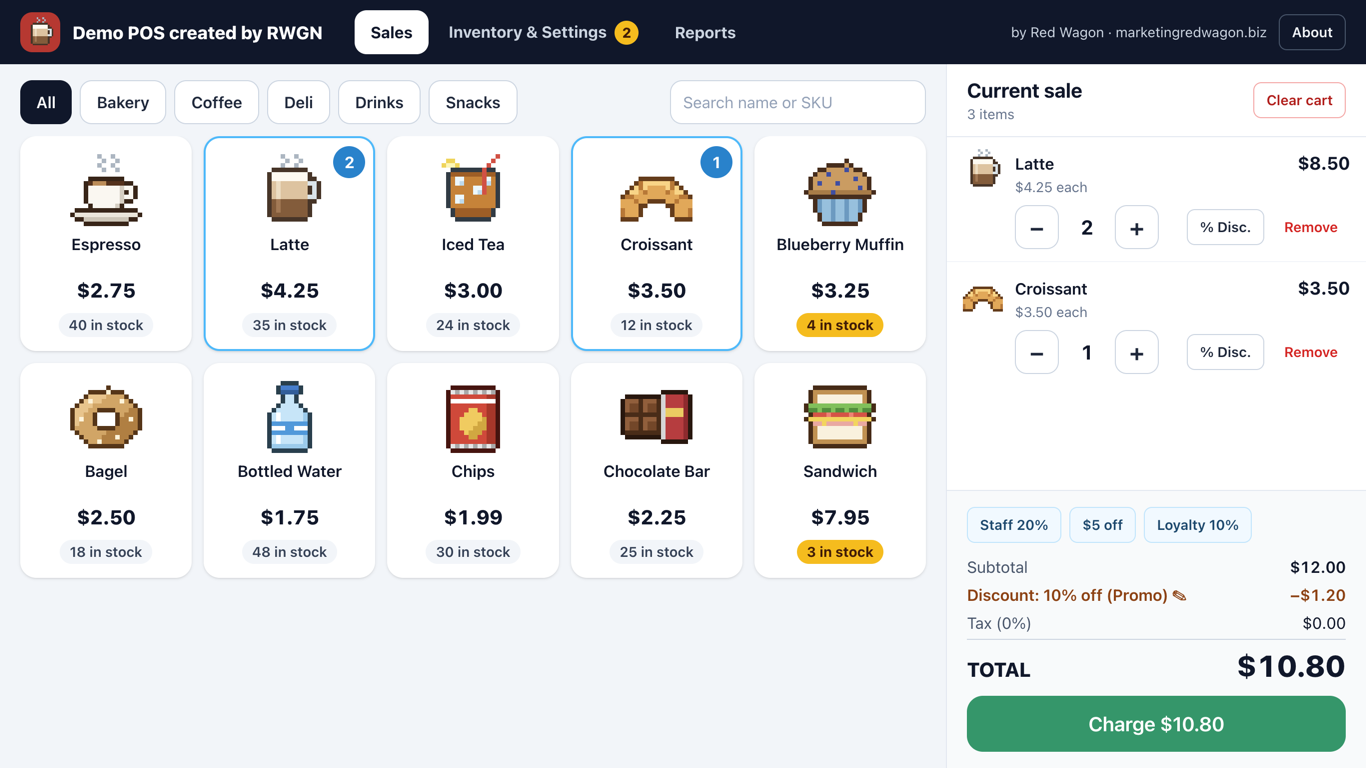
- product cards with pixel-art images, category tabs and search;
- live stock badges, amber when an item runs low and red when it's out;
- custom discounts: a percentage or a fixed dollar amount, on one item or the whole order, plus one-tap presets;
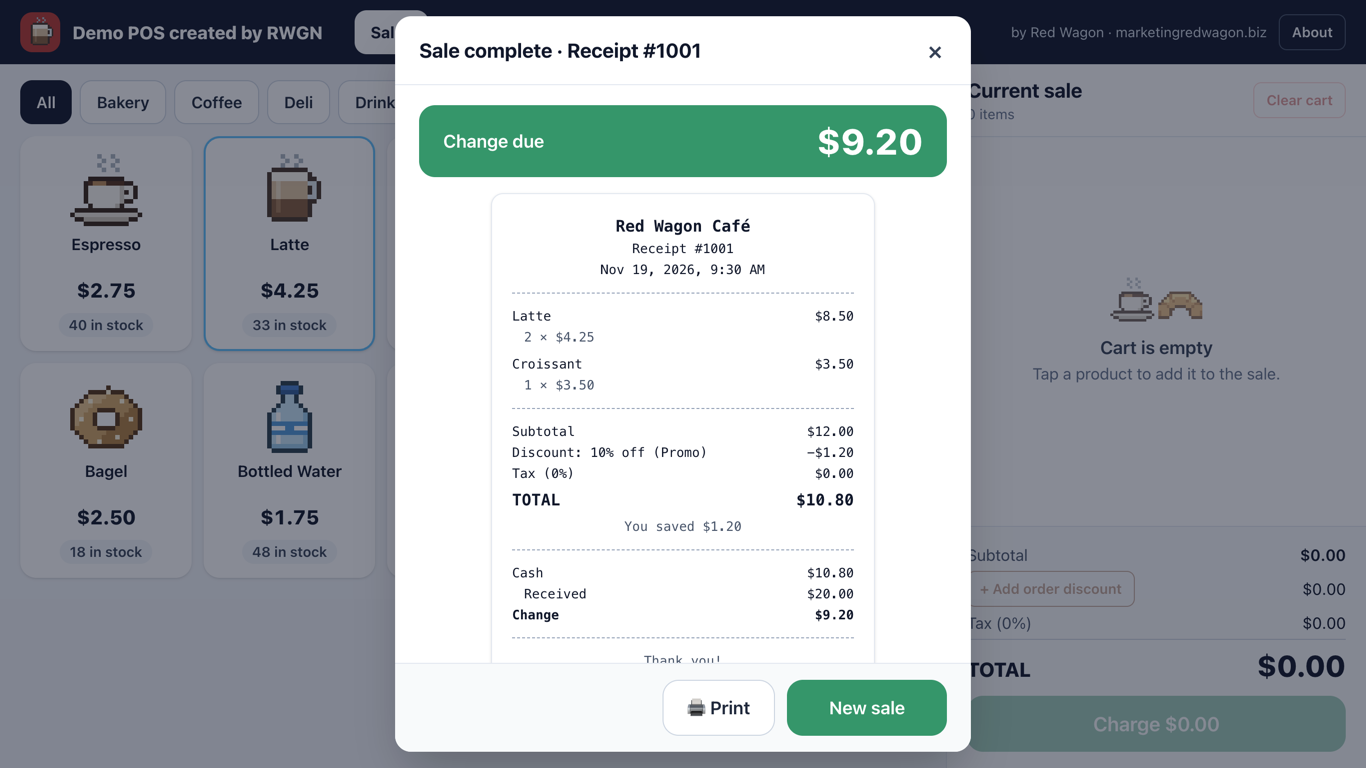
- cash payments with automatic change, card payments, and split payments;
- inventory that drops automatically with every sale, plus receiving and adjusting stock;
- reports: daily revenue, cash vs card, top sellers, voided sales and CSV export
An important distinction about card payments: the POS doesn't process cards. The card is run on the store's existing terminal, and the cashier records the payment: card type, optionally the last four digits and the approval number. The app never asks for a full card number, expiry date or CVV, and never stores one.
Offline by design, not by accident
"Works without internet" is easy to say. I wanted it to be impossible for the app to reach the internet, even by mistake:
- a strict Content Security Policy that blocks every outside connection;
- the main process cancels any request that isn't a local file;
- no CDN fonts, no remote images, no analytics, and even the spellchecker is off, because it downloads dictionaries;
- the only external link, to my agency's website, opens in the system browser and never inside the app
To check it, I deliberately sent a request to an outside website from inside the app. It was blocked.
The app is built with Electron, React and TypeScript, so it runs as a real desktop program on Windows and macOS, not a website in a browser tab. All data lives in a single file. Every save writes to a temporary file first and then swaps it in, so a power cut in the middle of a sale can't leave a half-written file behind.
Money math you can trust
Money and floating-point math don't mix: in most programming languages, 0.1 + 0.2 is not exactly 0.3. So every amount in the app is stored as whole cents, and percentages as basis points (10% = 1000). Rounding happens in integer math. Discounts are capped so a total can never go negative, and a cart can never hold more of an item than there is in stock.
Testing it like a real shift
- 54 unit tests covering discount types, split payments, stock never going negative, and voided sales returning items to stock;
- a strict TypeScript check and a production build, both clean;
- the full demo script run end to end on a 1366×768 screen
One example from that run: two lattes and a croissant come to $12.00, and a 10% promo discount brings that to $10.80. The customer pays with a $20 bill. The receipt shows $9.20 change, the latte stock drops from 35 to 33, and the sale shows up in the daily report under cash.
The demo also ships as ready-to-run apps: a universal macOS version for Intel and Apple Silicon, and a portable Windows .exe.
What a demo is, and what it isn't
The demo took one morning to build, with an AI coding agent doing the heavy lifting from a detailed spec I wrote. That speed is the point: the client gets something real to click through before committing to anything.
A production version is a different job. It means the client's real products and branding, a receipt printer and cash drawer, a barcode scanner, staff logins, automatic backups and, if needed, several registers sharing stock over a local network, still with no internet. Realistically, that's about a month, including on-site testing and staff training.
The final result
- a working offline POS demo, running on a laptop with the Wi-Fi off;
- sales, discounts, cash, card and split payments, inventory and reports in one desktop app;
- zero network requests, by design;
- 54 passing tests, plus apps for Mac and Windows
For me, the interesting part wasn't the code. It was how quickly a client conversation changes once they can tap the buttons themselves instead of reading a proposal.
The demo is open source: https://github.com/ArtyKourakin/demo-pos
Want something like this built?
If your business needs software that works on your terms (offline, on your own hardware, without another subscription), let's talk. Book a free 20-minute call or message me on WhatsApp.